


Movatic
3.5352.00 Reviews
App Specs
- Version
- 26.5.1
- Updated On
- License
- Free
- Downloads
- 100,000+
- Developer
- Movatic
- Categories
- Maps & Navigation
- Platform
- Android
Screenshots
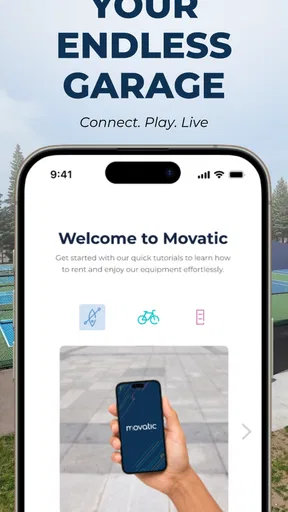


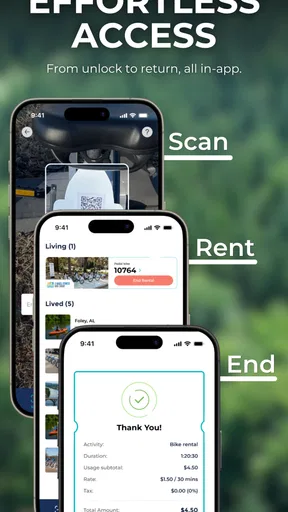
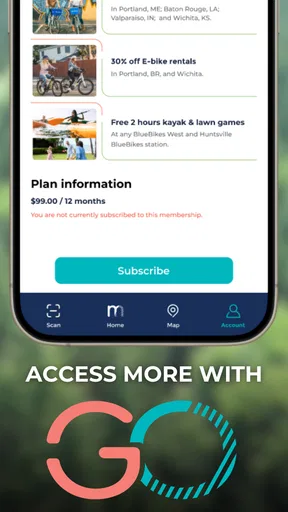
 Analysis by AppCompare
I first approached Movatic as a practical travel tool rather than a conventional map app. Its focus is shared bicycles, bicycle parking, and related local mobility services, so its value depends heavily on what is available in the area where you want to ride. That makes it different from an app that simply displays roads or calculates directions: Movatic is most useful at the moment when you need to find, unlock, use, or return a shared bike.
After using it, my overall impression is mixed but positive. The app is free, aimed at everyone, and has been available since October 2016. Movatic, the developer, has built a focused Maps & Navigation product that can simplify a short urban trip, especially when walking feels too slow and bringing your own bicycle is inconvenient. At the same time, it is not a universal replacement for a full navigation service, and some of the frustration people experience may come from the local bike-share system rather than from the app itself.
Where the experience usually gets stuck
The first thing I would tell a new user is not to treat the map as the whole service. Seeing a bicycle or parking location on screen is only one step in a chain that also involves the local fleet, station availability, the condition of a particular bike, and the rules for ending a trip. If any part of that chain is out of sync, the app can appear unreliable even when the underlying issue is elsewhere.
For example, a location may be visible while the available bikes have already been taken. A bike may be present but unsuitable to ride. A parking point may appear close on the map but be on the other side of a building, behind a gate, or across a busy road. These are ordinary urban problems, but they matter more in a bike-share app because the user is often standing outside, in a hurry, and trying to make a decision immediately.
I found that the most useful habit is to check the map as a planning aid, not as a guarantee. Before walking to a pickup point, look at the surrounding streets and consider whether there is another nearby option. This small change in expectations prevents a common mistake: committing to one location and then having no backup when the bike is unavailable.
The same applies at the end of a ride. A nearby parking area is not automatically a valid return point. If the local service requires a bike to be left in a particular place, ending the trip somewhere merely convenient can create an avoidable problem. I would always inspect the destination on the map before starting a ride, especially if I am heading to an appointment or a transit connection.
Another point of friction is that the app serves different local systems, so the exact experience can vary from one city or provider area to another. A workflow that feels straightforward in one place may be less obvious in another. This is one reason I would avoid judging Movatic after only a quick glance at the map. Its usefulness is tied to the service operating around you.
Worth Reading Before You Choose

EA SPORTS FC Mobile 26 Is a Bigger Football Game, but It Takes Time

Flipboard Shows What News Apps Must Do Beyond the Feed

Switching to Android Auto Means Rethinking Your Driving Routine

Google Calendar Makes a Crowded Week Easier to Manage

Ludo King Makes the Most of the Minutes Between Plans

Baby Panda World Brings Quick Play to Modern Phones, but Its Game Library Feels Busy
The public reception reflects that uneven experience. Movatic has an average rating of 3.5 from around 985 ratings, with roughly 352 written reviews, and it has passed 100K+ installs. Those figures suggest a real user base, but also a product that does not deliver a uniformly smooth experience for everyone. I read that as a reason to use it with practical expectations rather than assuming every ride will be effortless.
Why the first ride deserves a little extra time
When I am trying a bike-share app for the first time, I would not begin with a tight schedule. The first trip is when I learn where the map controls are, how a local bike is identified, what the app expects at pickup, and how parking is handled at the destination. Even if those actions are simple, discovering them while standing beside a bike is more stressful than learning them before an important journey.
A short test ride is more informative than a long one. It lets me see whether the available bikes are actually easy to locate, whether the return area is convenient, and whether the app reflects the physical situation on the street. That is a more honest test of Movatic than judging it only by its interface.
Setup checks that prevent avoidable trouble
Movatic runs on Android 7.0 and later, which makes it accessible to many older phones as well as newer devices. I would still check the phone before heading out, particularly if it has limited storage, an aging battery, or an outdated system environment. A bike-share app is not something I want to troubleshoot after leaving home with a low battery.
My preferred setup is simple: install the current version, open it while connected to a reliable network, and inspect the local map before walking to a bike. The current version is 26.5.1, so keeping the app updated is a sensible first step when the installed copy behaves strangely. Updates do not solve every local service issue, but they remove one easy source of confusion.
I also recommend opening the app before reaching the pickup point. This gives the map time to load and lets me notice whether the area is covered at all. If the relevant service does not appear where I expect it, I would not assume that walking farther will solve the problem. I would first confirm that I am looking at the correct part of the map and that the phone has a working connection.
Location accuracy is another practical check. If the blue position marker is noticeably away from where I am standing, I would move into a more open area and refresh my position rather than selecting the nearest marker blindly. Tall buildings, underground passages, and dense streets can make any location-based app look wrong. In that situation, the map may be showing an imprecise phone position, not an incorrect bike location.
For a first use, I would also make sure the phone is signed in or otherwise ready for the actions the local service requires. I would not wait until I am beside a bike to discover that an account step, confirmation screen, or payment-related action needs attention. The exact process can differ by operating area, but the general lesson is consistent: prepare the app before the ride begins.
Because Movatic is free to download, it is easy to install as a backup even if I normally use another navigation app. That is useful when a city’s bike-share service is organized around Movatic. However, free installation should not be confused with a promise that every local ride has the same conditions. The app is the access point to a service, while the service itself determines much of what I can actually do.
A better way to prepare for a real journey
For an everyday trip, I would plan the ride in two layers. First, I would use a general map app to understand the route, major crossings, hills, and the final walking section. Then I would use Movatic to check the bike pickup and return options. This division of labor is more reliable than expecting one app to handle both broad route planning and the operational details of shared bicycles.
I would also keep a fallback in mind. If the nearest bike is gone, can I walk to another location? If the destination parking area is full or inconvenient, is there another legal place nearby? Having those answers before starting is especially helpful when traveling to work, a station, or an appointment. It turns Movatic from a single-point gamble into one part of a flexible plan.
Recovering when a ride or map does not go as expected
When the map looks stale, my first response is to pause rather than repeatedly tapping every control. I check the network, confirm that the map is centered on the right area, and reopen the relevant view if necessary. If the phone is struggling with location, I move somewhere with a clearer view of the sky. These are basic steps, but they are safer than walking toward a marker that may no longer represent the street situation.
If a bike is shown but cannot be found, I compare the marker with the surrounding streets and landmarks. The correct approach may be on a parallel road or inside a public space rather than directly at the point shown. I would not enter restricted areas or cross unsafe roads just to reach a marker. A bike-share trip is not worth ignoring ordinary pedestrian safety.
When a bike is physically present but the app does not behave as expected, I would first record the practical details: the location, the bike identifier if one is visible, and what the screen is showing. Then I would retry once after checking connectivity. Repeated attempts without understanding the state can make it harder to know whether an action succeeded. My rule is to verify the app’s status before moving away from the bike.
The same caution matters when finishing a ride. I would not assume that leaving the bicycle near a parking area means the trip has ended. I would remain with it long enough to confirm the final state shown by the app or the local service. If the status does not change, I would check the exact return position and network connection before trying again.
This is one of the less obvious trade-offs of Movatic: it can make a shared bike easier to locate, but it also makes the user responsible for paying attention to the digital end of the trip. With a privately owned bicycle, locking it correctly is mostly a physical task. With a shared bicycle, the app and the street location both matter. That extra step is manageable, but it should be part of the time budget.
When a map refresh is not enough
If the same problem continues after a connection and location check, I would stop treating it as a simple display glitch. The local fleet may be unavailable, the bike may have been reported by another rider, or the parking area may not accept returns at that moment. In those cases, changing the phone’s settings repeatedly is unlikely to create a bike or make a full location available.
My practical recovery plan would be to move to the nearest alternative shown in the app, use another form of transport, or postpone the ride. This sounds obvious, but it is important because bike-share users often discover problems at the most time-sensitive point of a journey. A backup plan is not a criticism of Movatic; it is a sensible response to a service that depends on real-world vehicles and parking capacity.
I would also avoid blaming the app for every delay caused by the street environment. A blocked sidewalk, a closed entrance, construction, poor cellular coverage, or a crowded parking area can create the impression that the app is failing. The screen can only guide me toward the service; it cannot remove obstacles between the marker and the actual bicycle.
When Movatic is not the cause
Location apps are easy to judge unfairly because they sit between the user and several outside systems. Movatic may display the local bike-share network, but availability, bicycle condition, return capacity, and street access are all physical realities. If a bike is damaged, missing, or surrounded by an obstacle, the best software interface cannot make that ride pleasant.
Phone hardware also matters. An older device may take longer to obtain a location, switch between networks slowly, or lose power during a trip. Since Movatic supports Android 7.0 and above, compatibility is broad, but compatibility does not guarantee identical performance on every phone. I would test the app at home before relying on it for a long journey.
There is also a difference between navigation and access. A traditional map app is generally better for comparing walking, driving, cycling, or public transport routes across a city. Movatic is more specialized: its strength is connecting the map with a local shared-bike workflow. If I only need turn-by-turn directions, I would choose the conventional navigation tool. If I need to know where the shared bicycle network can help me, Movatic is the more relevant companion.
That comparison explains who should skip it. Someone who owns a bicycle, rarely uses shared mobility, or lives outside an area served by the app may gain little from installing it. Likewise, a traveler who needs dependable door-to-door routing should not rely on Movatic alone. It is best for people whose journeys begin or end near a supported bike-share location and who are comfortable adapting when availability changes.
On the other hand, it is a good fit for short urban trips with an awkward middle section. I can imagine using it to leave a train station, cover the distance to a meeting, and return the bike near a different destination. It also makes sense for a visitor who does not want to carry a bicycle through a city or arrange a traditional rental. The app becomes especially useful when the trip is too long to walk comfortably but too short to justify a car or taxi.
One of my favorite practical uses is combining it with public transport. I would use a train or bus for the long part of the journey, then check Movatic for the final local connection. The important trade-off is that I would verify both ends before setting off. A bike at the departure point is helpful only if I can also finish the ride near the destination without creating a new walking problem.
What I would change in my own routine
I would not open Movatic only after arriving at the station. I would check it while planning the trip, note a second pickup option, and identify a return area near the destination. This workflow reduces pressure and exposes coverage gaps early. It also helps me decide whether a shared bike is genuinely faster than walking or using another transport option.
For regular users, I would keep the app available but avoid assuming that yesterday’s pattern will repeat exactly. Fleet availability changes, and a convenient parking point can be less useful at another time. The app is most effective when I treat its map as current guidance that still needs a quick reality check on the street.
Privacy and phone comfort are also part of the decision, even without turning them into a technical debate. If I dislike depending on a phone during every stage of a journey, a privately owned bicycle or a conventional rental may feel simpler. Movatic suits people who accept that the handset is part of the transport process and who are willing to check the final ride state before leaving the bike.
My practical verdict after using it
Movatic is a focused, useful app for shared bicycles and bike parking, but it rewards preparation more than improvisation. I like that it addresses a specific urban problem instead of pretending to replace every navigation tool. When the local network is available and the map matches the street, it can turn a potentially awkward short trip into a straightforward one.
Its weaknesses are closely tied to that specialization. The experience depends on local coverage, real-time vehicle availability, parking conditions, phone location accuracy, and a stable connection. Some of the most frustrating moments happen when those pieces do not line up. I would not install it expecting the polish or universal coverage of a major general-purpose map service.
The app has a 3.5 average and more than 100K+ installs, which places it in the category of a widely used but not universally loved mobility tool. For me, that profile feels believable: the concept is practical, while the quality of an individual ride can vary according to circumstances outside the screen.
I would recommend it to commuters, visitors, and occasional riders who already know that a shared-bike service operates near their route. I would especially recommend using it alongside a regular map app, with a little extra time for the first ride and a fallback location in mind. That combination makes its strengths more visible and its limitations less disruptive.
I would skip it if I need guaranteed routing, live support at every step, or a transport option that works independently of local bike availability. I would also skip relying on it for an important appointment until I had tested the pickup and return routine myself. The app is not difficult to understand, but the surrounding service can introduce enough uncertainty to matter.
My final view is that Movatic works best as a practical access tool, not as a complete travel planner. It can help me find a shared bicycle, think ahead about parking, and bridge the final part of a city journey. The key is to verify both the bike and the destination before committing to the ride. Used that way, this free Maps & Navigation app from Movatic is worth keeping for the right local network, provided I remember that a map marker is an aid to a trip, not a guarantee that the street will cooperate.
Pros
- Simple setup for renting bikes
- scooters
- and other shared equipment.
- Real-time availability helps users find nearby vehicles or rental stations.
- Supports cashless payments directly within the app.
- Rental history and receipts make it easy to track previous trips.
- Useful for campuses
- apartments
- workplaces
- and community mobility programs.
Cons
- Availability depends heavily on the local operator and service coverage.
- Some vehicles or stations may appear unavailable without clear explanations.
- Pricing
- deposits
- and extra fees can vary significantly by location.
- GPS accuracy may occasionally make nearby vehicles difficult to locate.
- Customer support response times may depend on the individual service provider.
FAQs for Movatic
What is Movatic and what can I use it for?
Movatic is a shared-mobility platform that helps users find, unlock, rent, and pay for available vehicles or equipment in participating locations. Depending on the operator, this may include bikes, e-bikes, scooters, or other rentable assets. The app also provides information about nearby stations, vehicle availability, pricing, ride rules, and return requirements, although the exact services depend on your local Movatic program.
How do I rent a bike, scooter, or other vehicle with Movatic?
After creating an account and signing in, allow Movatic to access your location so it can display nearby vehicles or stations. Select an available item on the map, review the displayed price and rental rules, then scan its QR code or follow the unlock instructions. Before starting, check the vehicle for visible damage. When finished, return it to an approved area and end the trip through the app.
How much does Movatic cost, and are there additional fees?
Movatic itself may be free to download, but every operator sets its own rental prices, deposits, passes, and penalties. Charges can include an unlock fee, per-minute or per-hour usage rates, reservation costs, late-return fees, damage charges, or fees for leaving a vehicle outside the permitted service area. Always review the price shown in the app before confirming a rental, since rates vary by location.
What payment methods and account details are required?
Movatic generally requires users to create an account and add a supported payment method before renting. Depending on the local operator, accepted options may include debit cards, credit cards, digital wallets, or promotional credits. You may also need to provide an email address, phone number, or identity information. Make sure your payment details are current, because an expired card can prevent unlocking or ending a ride.
What should I do if the vehicle is damaged, unavailable, or will not unlock?
If a vehicle appears damaged, unsafe, or different from its description, do not begin the rental. Use Movatic’s in-app support or reporting option to document the issue, preferably with photos, and select another vehicle when possible. If the QR code fails or the lock does not open, check your internet connection, confirm that the rental was approved, and contact the local operator before moving the vehicle.


